


🎉How to Register Your Unique Referral Code & Start!🎉
1. 🚀 Update the ESYSUNHOME App;
2. 🔓 Launch the App & Log In;
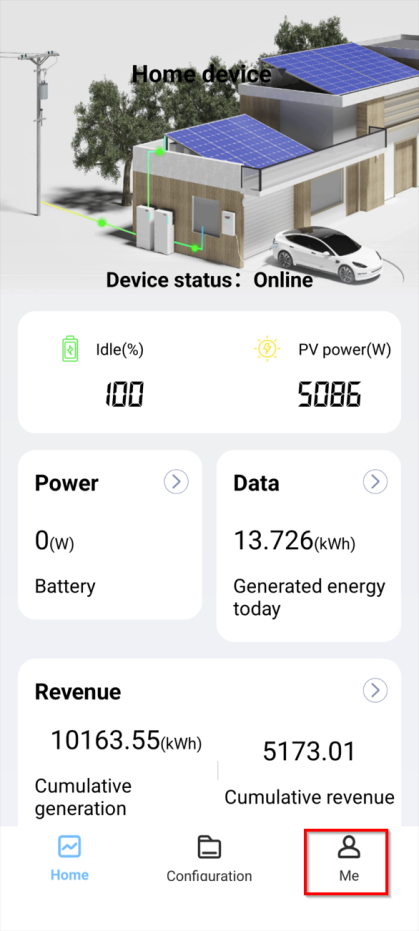
3. 👤 Tap on “ME” form the bottom right corner.
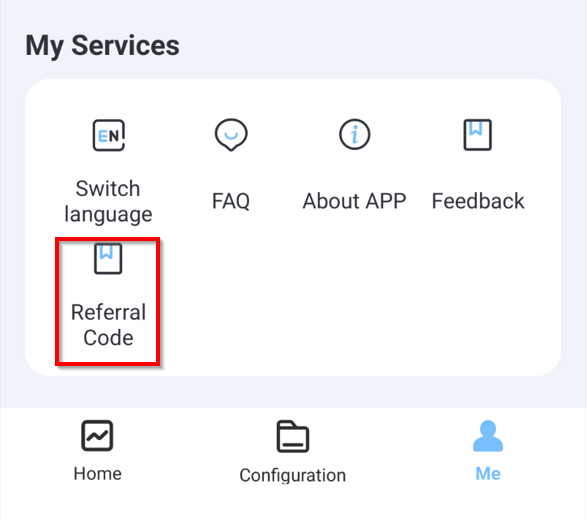
 4. 📋 Select Referral Code under “My Services”.
5. 🔑 Select “My Referral Code“

6. 💰 Enter Your Bank Details & Check Your Email
— Your unique referral code will be shown on top, please enter your bank account details correctly and ensure your email address is valid.
❓ Need Help?
If you have any questions or run into any issues, don’t hesitate to reach out to us at
support@esysunhome.com
We’re here to help!
🌟 Now you’re all set! Share your referral code with your friends or loved ones, and start earning those rewards!