 Global-EN


💸 How to Submit Your Cashback Application?💸
1. 🚀 Update the ESYSUNHOME App from your preferred app store (iOS or Android)
2. 🔓 Launch the App & Log In
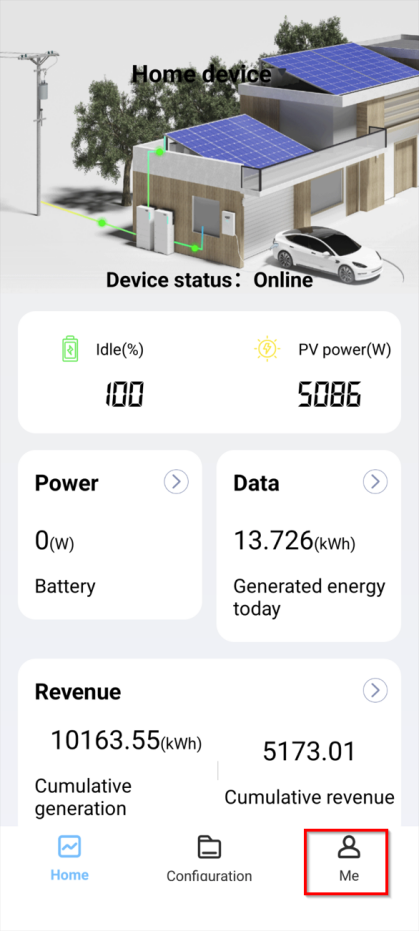
3. 👤 Tap on "Me" from the Bottom Right Corner
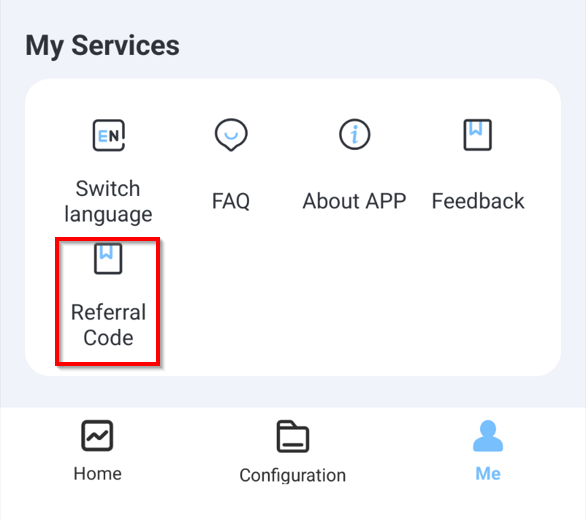
4. 📋 Select "Referral Code" Under "My Services"
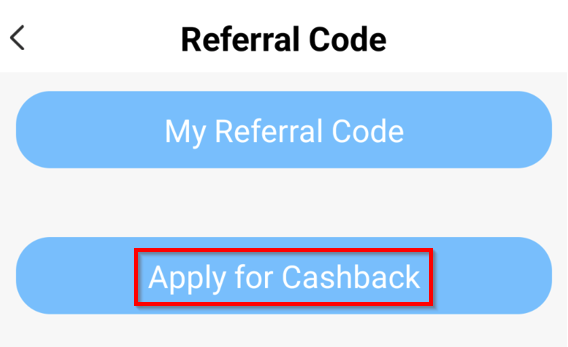
5. 💰 Select "Apply for Cashback"
6. 📝 Enter All Required Details
Fill in all necessary details:
- Your referrer’s unique referral code
- Your newly installed device SN (Serial Number)
- Your installer's company name
- Your name, street address, phone number, and email address
- Your bank account details
- Purchase invoice
- A photo of the installed device
Once done, hit Save to submit your application.
7. 📧 Receive a Confirmation Email
You’ll get a confirmation email to the address you provided, verifying your submission.
❓ Need Help?
If you have any questions or encounter any issues, reach out to us at
support@esysunhome.com
We’re here to assist!
🌟 Don’t miss out! Submit your cashback application and enjoy the rewards you’ve earned!